

How to Secure Environment Variables for LLMs, MCPs, and AI Tools Using 1Password or Doppler
Software engineer and founder with a background in finance and tech. Currently building aVenture.vc, a platform for researching private companies. Based in San Francisco.
If you're using AI coding tools like Claude Desktop, Cursor, or Continue, you've probably configured MCP servers or API keys somewhere. And if you're like most developers, those secrets are sitting in plain text in JSON config files.
That's a security nightmare waiting to happen—especially with the rise of prompt injection attacks and untrusted MCP servers potentially accessing your environment.
The Security Problem
MCP Servers: Supabase, GitHub, Linear, etc. all need authentication tokens
LLM Providers: OpenAI, Anthropic, Google AI keys for model access
External Services: Database credentials, cloud provider tokens, OAuth secrets
Storing these in plain text config files means they're exposed to any process that can read your filesystem, including potentially malicious MCP servers or compromised dependencies.
Two solutions work well: 1Password CLI for those already in the 1Password ecosystem, and Doppler for teams needing centralized secret management.
Part 1: Understanding the MCP Security Model
When an AI assistant uses an MCP tool, your secrets are injected by the host app as process environment variables only when the MCP server starts. The LLM never sees the values; the MCP server process does. This just-in-time injection is the core security boundary we'll use.
┌─────────────┐ ┌──────────────┐ ┌─────────────┐ │ Claude/ │ JSON │ MCP Host │ ENV │ MCP Server │ │ LLM │ RPC │ (Claude │ VARS │ Process │ │ │ ──────> │ App) │ ──────> │ │ │ NEVER sees │ │ Injects │ │ SEES the │ │ secrets │ │ secrets │ │ secrets │ └─────────────┘ └──────────────┘ └─────────────┘
Part 2: The 1Password CLI Approach (Personal Use)
If you're already using 1Password, their CLI provides excellent integration for personal secret management.
1Password Setup
- Install 1Password CLI
# macOS
brew install --cask 1password-cli

# Windows (winget)
winget install 1Password/CLI

# Linux (apt)
curl -sS https://downloads.1password.com/linux/keys/1password.asc | \
  sudo gpg --dearmor --output /usr/share/keyrings/1password-archive-keyring.gpg
echo "deb [arch=$(dpkg --print-architecture) signed-by=/usr/share/keyrings/1password-archive-keyring.gpg] https://downloads.1password.com/linux/debian/$(dpkg --print-architecture) stable main" | \
  sudo tee /etc/apt/sources.list.d/1password.list
sudo apt update && sudo apt install 1password-cli
- Sign In and Configure
# Sign in (will prompt for account details)
op signin

# Create a vault for AI tools
op vault create "AI Tools"

# Store secrets
op item create \
  --category "API Credential" \
  --title "Anthropic API Key" \
  --vault "AI Tools" \
  'api_key[password]=sk-ant-...'

op item create \
  --category "API Credential" \
  --title "OpenAI API Key" \
  --vault "AI Tools" \
  'api_key[password]=sk-...'
1Password env template (.env.op)
ANTHROPIC_API_KEY="op://AI Tools/Anthropic API Key/api_key"
OPENAI_API_KEY="op://AI Tools/OpenAI API Key/api_key"
SUPABASE_ACCESS_TOKEN="op://AI Tools/Supabase Token/api_key"
GITHUB_TOKEN="op://AI Tools/GitHub Token/token"
Wrapper and IDE config
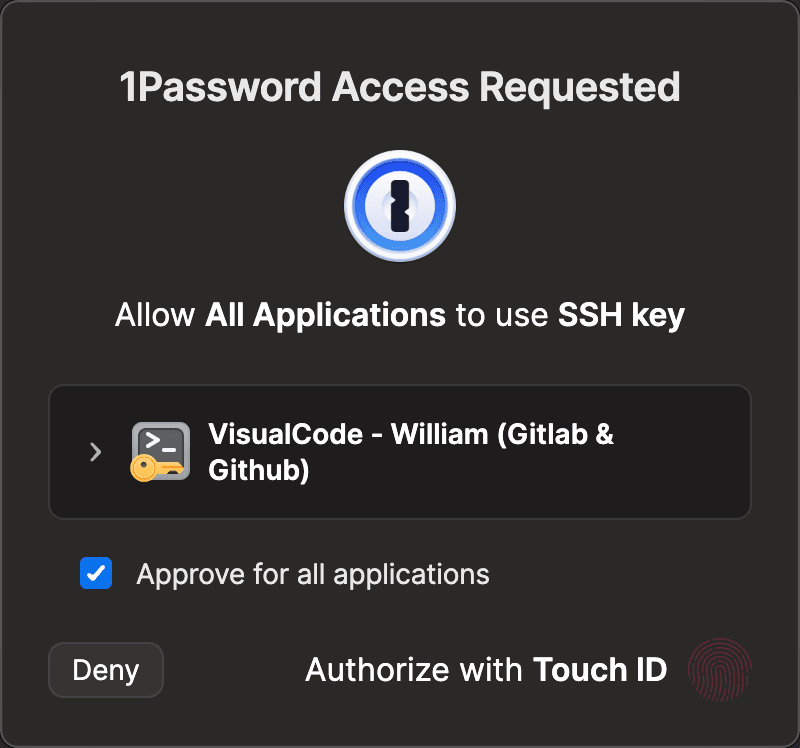
1Password needs a wrapper to refresh auth periodically. Create ~/.config/1password/op-mcp-wrapper:
#!/bin/bash
# ~/.config/1password/op-mcp-wrapper
if ! op account get &>/dev/null 2>&1; then
    eval $(op signin)
fi
op run --env-file="$HOME/.env.op" -- "$@"
Make it executable:
chmod +x ~/.config/1password/op-mcp-wrapper
Claude Desktop config (~/Library/Application Support/Claude/claude_desktop_config.json):
{
  "mcpServers": {
    "github": {
      "command": "/Users/YOUR_USERNAME/.config/1password/op-mcp-wrapper",
      "args": ["npx", "-y", "@modelcontextprotocol/server-github"]
    },
    "filesystem": {
      "command": "/Users/YOUR_USERNAME/.config/1password/op-mcp-wrapper",
      "args": [
        "npx",
        "-y",
        "@modelcontextprotocol/server-filesystem",
        "/Users/YOUR_USERNAME/projects"
      ]
    }
  }
}
Part 3: The Doppler Approach (Team-Friendly)
Doppler is purpose-built for developers environment variables across teams and environments. It's my top recommendation if you need centralized control and audit logging, and works well for CI/CD and general development environment-focused secrets/automatic injection. They have a lot of deployment options, including normal shell and API access and a CLI tool like 1Password's, but also custom packages for many different languages/frameworks.
Doppler Setup
- Install Doppler CLI
# macOS/Linux
curl -Ls https://cli.doppler.com/install.sh | sh

# macOS (Homebrew)
brew install dopplerhq/cli/doppler

# Windows (Scoop)
scoop install doppler
- Authenticate and Create Project
# Login to Doppler
doppler login

# Create a project for your AI tools
doppler projects create ai-tools

# Set up a config for local development
doppler setup --project ai-tools --config dev

# Add your secrets
doppler secrets set ANTHROPIC_API_KEY "sk-ant-..."
doppler secrets set OPENAI_API_KEY "sk-..."
doppler secrets set SUPABASE_ACCESS_TOKEN "sbp_..."
doppler secrets set GITHUB_TOKEN "ghp-..."
- Generate and store a Service Token for non-interactive use
# Create a service token for your local machine
# (copy the token printed, it starts with dp.st.)
doppler configs tokens create --project ai-tools --config dev --name "desktop-mcp"

# Store the token in Doppler CLI config (no env var export)
doppler configure set token dp.st.dev.xxxxx
Doppler MCP configuration
Configure MCP servers to use Doppler for secret injection:
Claude Desktop ConfigurationEdit ~/Library/Application Support/Claude/claude_desktop_config.json:
{
  "mcpServers": {
    "github": {
      "command": "doppler",
      "args": [
        "run",
        "--project",
        "ai-tools",
        "--config",
        "dev",
        "--",
        "npx",
        "-y",
        "@modelcontextprotocol/server-github"
      ]
    },
    "supabase": {
      "command": "doppler",
      "args": [
        "run",
        "--project",
        "ai-tools",
        "--config",
        "dev",
        "--",
        "npx",
        "-y",
        "@supabase/mcp-server-supabase",
        "serve",
        "--project-id",
        "your-project-id"
      ]
    },
    "postgres": {
      "command": "doppler",
      "args": ["run", "--", "npx", "-y", "@cloudflare/mcp-server-postgres"]
    }
  }
}
How This Works
- Authenticates using your service token
- Fetches the latest secrets from your project
- Injects them as environment variables into the MCP server process
- The server runs with access to the secrets, but they're never written to disk
Part 4: Comparison & Recommendations
Doppler and 1Password compared for AI tool secret management:
| Feature | Doppler | 1Password CLI |
|---|---|---|
| Setup Complexity | Simple (service token) | Moderate (wrapper script needed) |
| Authentication | Persistent token | Periodic (Touch ID/password) |
| Team Sharing | ✅ Excellent | ⚠️ Requires family/business plan |
| Audit Logging | ✅ Full audit trail | ✅ Activity log |
| Performance | Fast (cached locally) | Slower (auth overhead) |
| Offline Access | ✅ With cached secrets | ❌ Requires connection |
| Price | Free tier available | $3–8/month per user |
| MCP Integration | Native (no wrapper) | Requires wrapper script |
| IDE Support | Direct env injection | Limited (via wrapper) |
| Secret Rotation | ✅ Automatic | Manual |
When to Use 1Password
- Personal projects where you're the only developer
- Already using 1Password for other passwords
- Highest security requirements (biometric auth on every access)
- Mixed secret types (not just env vars but also passwords, SSH keys)
When to Use Doppler
- Team environments where multiple developers need the same secrets
- CI/CD pipelines that need programmatic access
- Rapid iteration where you're frequently updating secrets
- Multiple environments (dev, staging, prod) with different values
- Audit requirements for compliance
Part 5: Security Best Practices
Critical Security Tips
Never commit tokens: Add
*.env,*config.jsonwith secrets to.gitignore.Use read-only tokens where possible for MCP servers.
Rotate secrets regularly: Both tools support secret rotation.
Enable 2FA on Doppler and 1Password accounts.
Scope permissions tightly: Give MCP servers minimum required access.
Additional Security Hardening Options
Rate Limiting and Monitoring
For Doppler, enable activity webhooks:
doppler settings webhook create \
  --project ai-tools \
  --url "https://your-monitoring.com/doppler-webhook" \
  --event "secret.fetch"
For 1Password, use their Events API to monitor access:
# Check recent secret access
op events-api list --limit 10 | jq '.[] | select(.action == "reveal")'
Emergency Revocation
If you suspect a token is compromised:
Doppler:
# Revoke all service tokens
doppler configs tokens revoke --all --project ai-tools --config dev

# Generate new token
doppler configs tokens create --project ai-tools --config dev --name "new-desktop"
1Password:
# Sign out all sessions
op signout --all

# Rotate the specific secret
op item edit "Anthropic API Key" api_key="sk-ant-new-key..."
Part 6: Troubleshooting Common Issues
Doppler Issues
DOPPLER_TOKENnot set: Ensure your token is exported in your shell profile.Project not found: Verify project name matches exactly (case-sensitive).
- Rate limited: Free tier has limits; upgrade or reduce polling frequency.
1Password Issues
Authentication required: Your session expired; run
op signinmanually.- Item not found: Check vault and item names match exactly.
- Biometric prompt not appearing: Enable Touch ID in 1Password settings.
General MCP Issues
Environment variables not visible: MCP server might be caching; restart the AI tool.
- Wrong values loaded: Check you're not overriding with local
.envfiles. Permission denied: Ensure wrapper scripts are executable (
chmod +x).
TL;DR
Securing your environment variables/secrets/credentials doesn't have to be complicated. With 1Password CLI or Doppler, you can:
- Keep all secrets encrypted and centralized
- Inject them just-in-time without exposing them in config files
- Maintain a full audit trail of what accessed which secret when
- Rotate credentials easily when needed
For most individual developers, 1Password is the most convenient choice. For teams and CI/CD, I prefer Doppler.